The AI helpdesk for WooCommerce stores
Emails and live chat in one inbox, with the customer's order and tracking next to every conversation. AI drafts each reply in the customer's language from your own store policies, and you check it before it is sent.
No credit card needed. Sign up and connect your store in a few minutes.
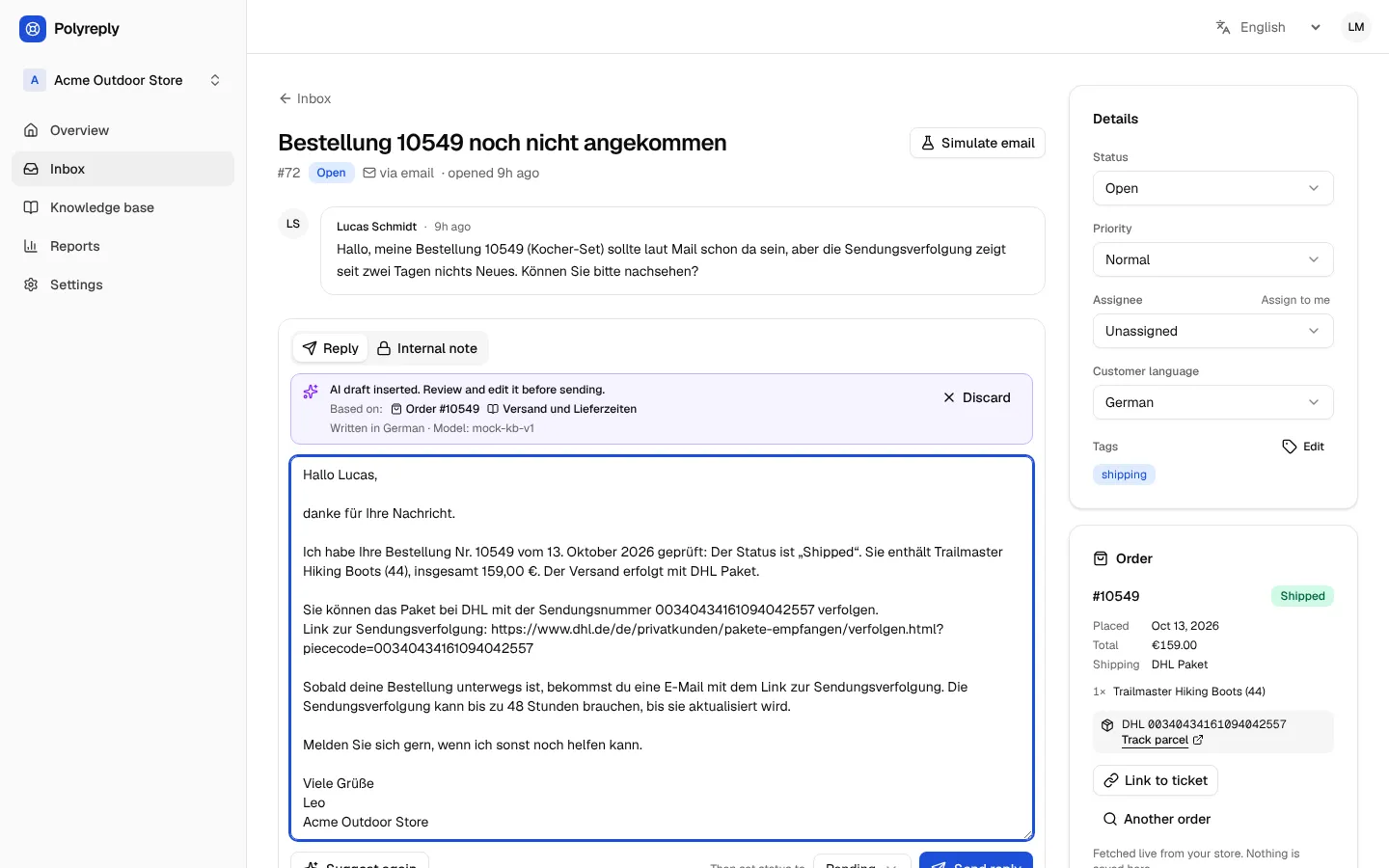
#72 Bestellung 10549 noch nicht angekommen
deLucas SchmidtEmail
Hallo, meine Bestellung 10549 sollte laut Mail schon da sein, aber die Sendungsverfolgung zeigt seit zwei Tagen nichts Neues. Können Sie bitte nachsehen?
Order 10549
ShippedTrailmaster Hiking Boots (44) · 159,00 €
DHL 00340434161094042557
See the app before you sign up
Screenshots of the real dashboard with sample store data.
Set up in three steps
No theme edits and no API keys to copy.
Install the plugin
Create your free account, then download Polyreply for WooCommerce from the WooCommerce page of your dashboard and upload it in WordPress under Plugins › Add New Plugin › Upload Plugin.
Click “Create a free account and connect”
The button is under WooCommerce › Polyreply. It opens Polyreply, you create your account, and you are back in WordPress with your store connected.
Answer chats with AI drafts
The chat button appears on your store. When a customer writes, open the conversation, click Suggest reply, check the draft and send it.
Not on WooCommerce? Add the chat to any website with one script tag, and forward your support email to the inbox.
Before and after
Five everyday support jobs in a small store, without and with Polyreply.
Before
Copy the order number, open WooCommerce, find the order, then paste the tracking link back into your reply.
With Polyreply
The order card sits next to the message, and the draft already includes the status and tracking number.
What you get
Made for small stores where the same few people pack the orders and answer the customers.
One inbox for email and chat
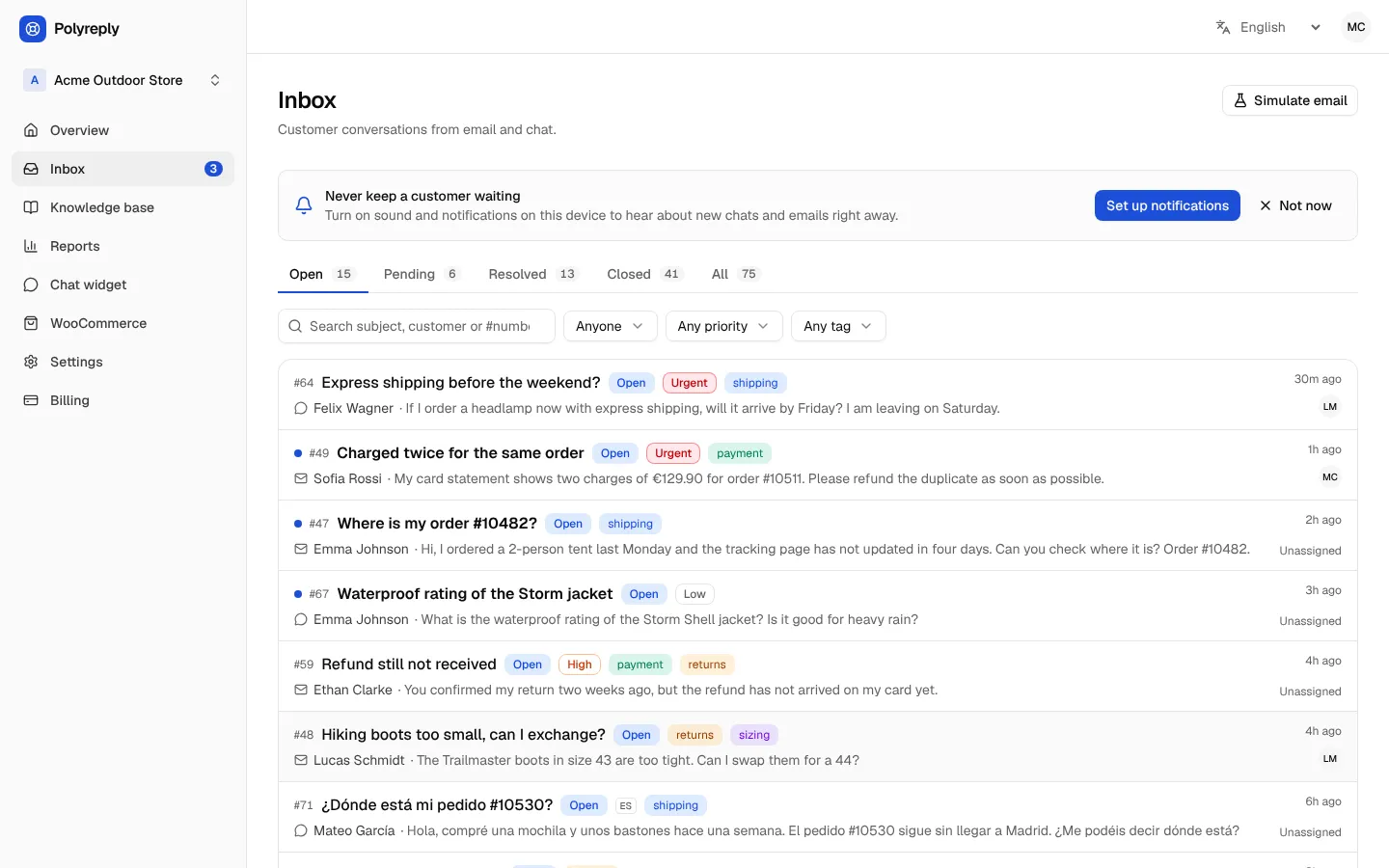
Every message becomes a conversation with a status, a priority, an assignee, tags and internal notes, so nothing is answered twice or forgotten.
AI drafts from your own policies
Write your shipping, returns and FAQ articles once. Drafts are based on them, and an agent edits and approves every reply.
The order next to the conversation
Status, products, total and tracking number, read live from WooCommerce when you open a conversation. Orders are never copied.
Replies in the customer's language
Drafts follow the language the customer wrote in. The dashboard itself is available in six languages.
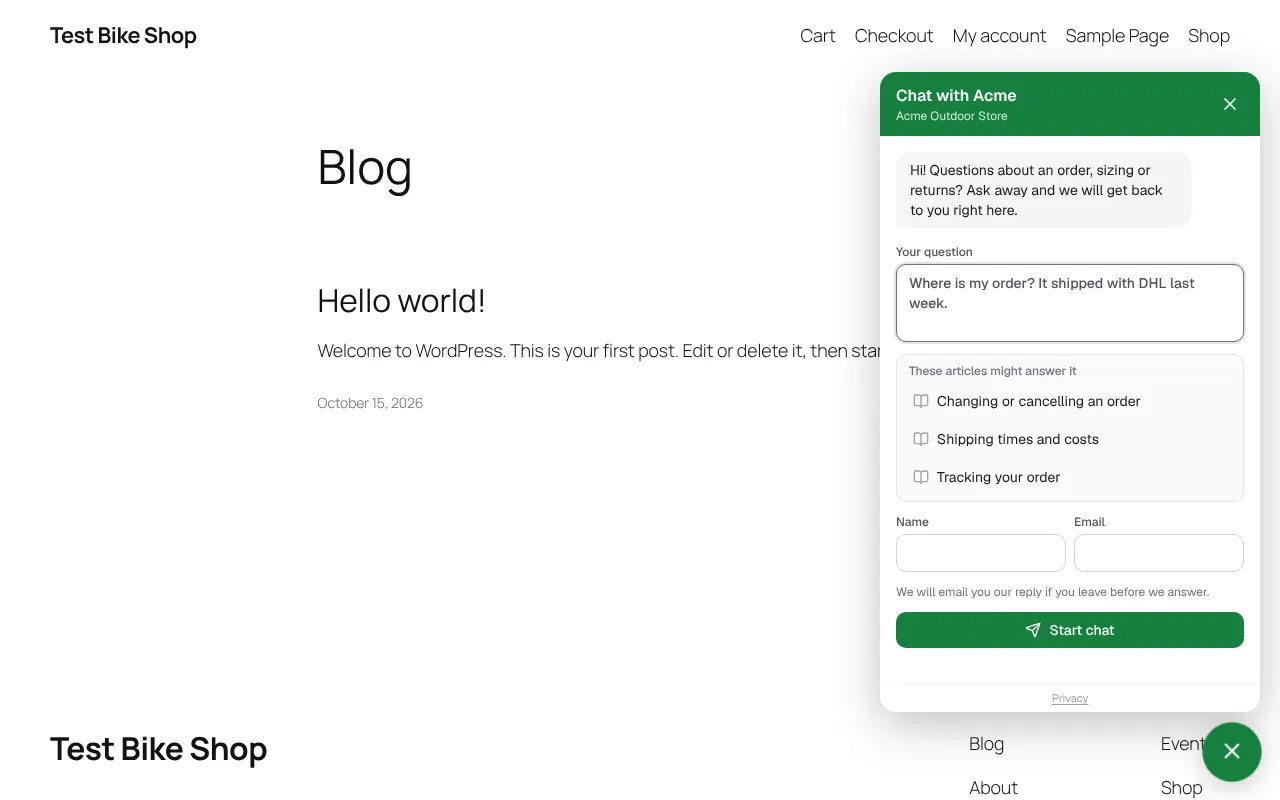
A chat widget for your store
Customers see help articles while they type, and get your answer by email if they have already left.
Notifications on phone and desktop
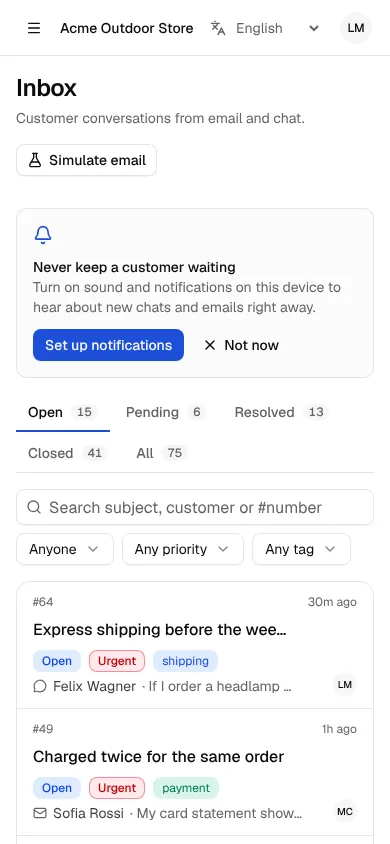
An unread count in the browser tab, an optional sound, push notifications, and an email when new tickets arrive.
Pricing
Start on the Free plan and upgrade when your store needs more. Owners change or cancel the plan from the Billing page.
AI drafts included - no per-conversation AI fees.
Free€0 per month€0 per year
For new stores trying out a shared inbox.
- 2 seats
- 100 tickets per month
- 30 AI drafts per month
- 25 articles
- Chat widget
- WooCommerce order card on tickets
Pro€29 per month€290 per year€58 less than 12 monthly payments
For growing stores with a small support team.
- 3 seats
- 300 tickets per month
- 1,000 AI drafts per month
- Unlimited articles
- Chat widget
- WooCommerce order card on tickets
Business€79 per month€790 per year€158 less than 12 monthly payments
For busy stores that answer customers all day.
- Unlimited team members
- 2,000 tickets per month
- 5,000 AI drafts per month
- Unlimited articles
- Chat widget
- WooCommerce order card on tickets
Need more than 2,000 conversations? Write to us at support@polyreply.app.
Prices in euros.
Questions store owners ask
Where is my data stored? What about GDPR?
The app and its database are hosted in the EU, in Frankfurt (Germany). For your customers' data you are the controller and we are your processor: the data processing terms (Article 28 GDPR) are part of the Terms of Service, and the Privacy Policy lists every provider and where it processes data. Orders are read live from your store and never copied.
Does the AI answer customers on its own?
No. The AI writes a draft into the reply box only when an agent clicks Suggest reply. The agent reads it, edits it if needed and sends it. Nothing reaches a customer without a person.
Which languages does it work in?
Customers can write in any language. Polyreply recognizes 28 languages and drafts each reply in the language of the conversation. The dashboard is available in English, Spanish, German, French, Portuguese and Italian.
Do I need WooCommerce?
The plugin is made for WooCommerce: it adds the chat to your store and shows each customer's order and tracking. On any other website you can add the chat with one script tag and forward your support email to the inbox, but order details are only available with WooCommerce.
How much does it cost?
The Free plan costs nothing. Pro (€29 per month) and Business (€79 per month) add more seats, tickets and AI drafts. Owners can change or cancel the plan from the Billing page at any time.
Can I cancel, export or delete my data?
Yes. There is no long-term contract. An owner can download every conversation, customer and article as JSON and CSV under Settings › General › Export data, and delete the workspace on the same page, which removes its data right away. Anyone can delete their own account under Settings › Profile. Questions? Write to support@polyreply.app.
Will I know when a customer writes?
Yes. The browser tab shows how many conversations are unread, and the dashboard can play a sound. Turn on push notifications under Settings › Notifications to hear about new messages on your phone or computer even when Polyreply is closed (on iPhone, add it to the Home Screen first). You can also get an email when new tickets arrive.
Can my whole team use it?
Yes. Invite people under Settings › Members as owners, who manage settings and billing, or as agents, who answer customers. The Free plan includes 2 team seats.
Will the chat slow down my store?
No. The chat button is one small script with no dependencies, under 10 KB, and the chat window only loads when a visitor opens it.
How do I get help?
Write to support@polyreply.app. Questions, bug reports and ideas all go to the same address.
Try it on your own store
Create a free account and connect your store in a few minutes.